AI Analytics: Analyze Traffic and Requests from Artificial Intelligence on Your Website - GPTBot, ClaudeBot, Perplexity Detection
Stop Being Blind to Your AI Traffic
GPTBot, ClaudeBot, Perplexity, Gemini... scrape your content daily. Senthor reveals who, what, and when, in real-time.
Discover What Google Analytics Never Shows You
A comprehensive dashboard that reveals invisible AI activity on your site
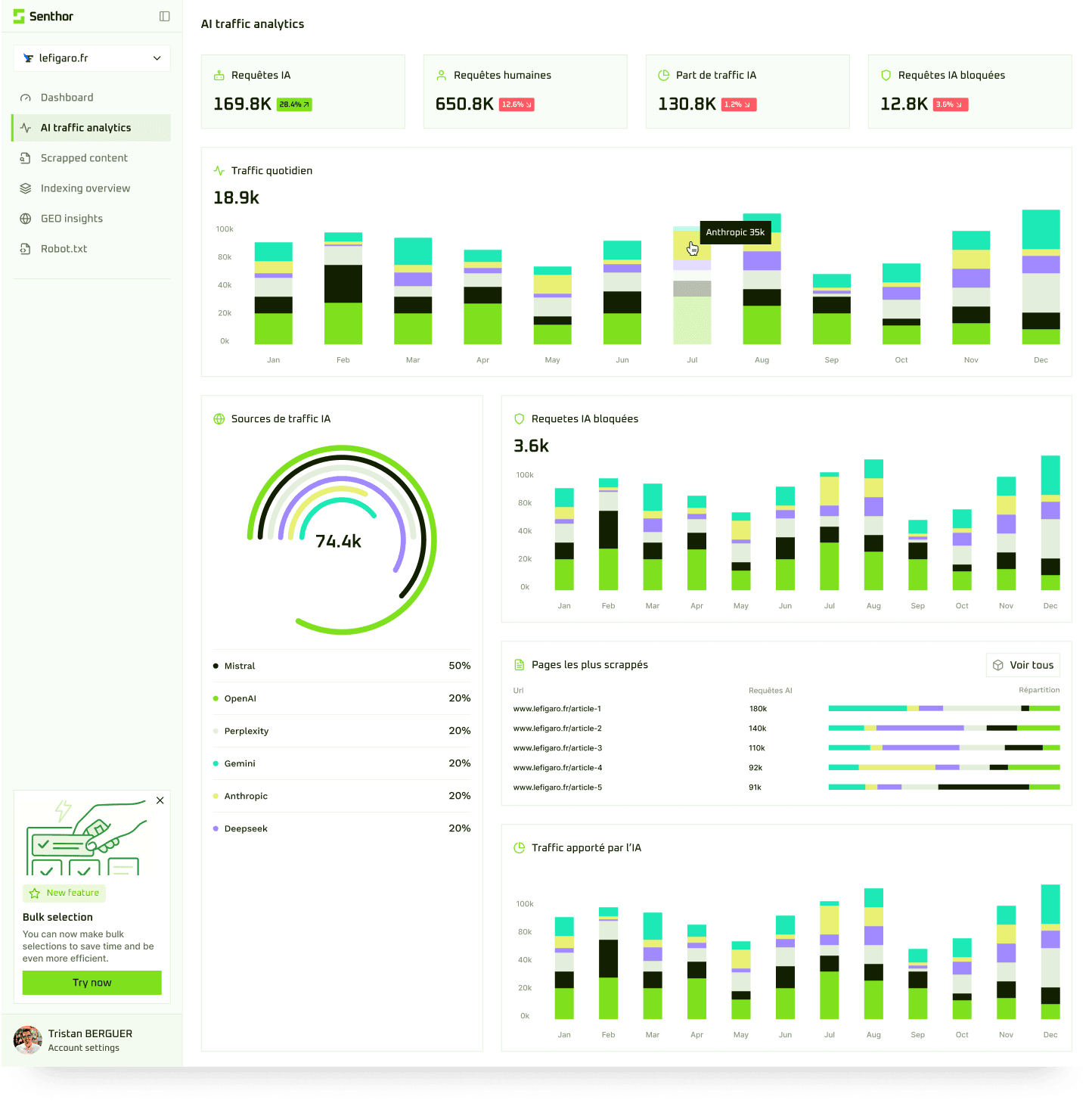
Complete AI Traffic Analytics
Visualize AI requests in real-time, identify bots (GPTBot, ClaudeBot, Perplexity...), and analyze month-over-month traffic evolution.
Complete AI Analytics
All the metrics you need to understand your AI traffic
AI Bot Identification
GPTBot, ClaudeBot, Perplexity, Gemini, Mistral... Precisely identify which AI bot visits your site.
Scraped Content
Discover which documents, PDFs, images, videos, texts, and audios are extracted by AIs.
Visited Pages
Track precisely which pages of your site are scraped and how frequently.
Scraping Frequency
Analyze how often AIs come back for your content, daily, weekly, monthly.
Protection & Blocking
Block unwanted scrapers while keeping your legitimate SEO and GEO bots active.
Monetization
Turn your AI traffic into revenue with access licenses and selective paywalls.
Senthor vs. The Traditional Stack
The traditional stack wasn't built for the AI era. See for yourself.
| Criterion | Google AnalyticsClassic Analytics | Cloudflare / WAFNetwork Protection | SenthorSpecialized AI Analytics |
|---|---|---|---|
| Primary Target | 👥Humans(classic visitors) | 🛡️Attacks (DDoS)(infrastructure protection) | 🤖AI & Scrapers(specialized analytics) |
| AI Bot Detection | ❌Filtered(invisible by default) | ✅Detects(BingBot, ChatGPT-User, etc.) | ✅Detects(GPT-4, Claude, Gemini, Perplexity...) |
| Metrics & Analytics | ❌None(bots ignored) | ⚠️Basic(request count, allow/block) | 📊Complete(content, pages, PDFs, images, videos) Unique |
| Scraped Content Analysis | 🚫None(no analysis) | 🚫None(just counters) | 🔍Detailed(understand what AIs are looking for) Unique |
| Control & Action | 🚫None(read-only) | ✅Allow / Block(per bot) | ⚙️Allow / Block(+ analytics to decide) |
Senthor = Classic Web Analytics + AI Traffic Analysis
Finally understand what AIs are looking for on your site
Who Uses Senthor?
From SEO/SEA/GEO agencies to content publishers, everyone wants to know what's happening on their site
SEO/SEA/GEO Agencies
Give your clients complete visibility into their AI traffic. Offer GEO strategies based on real data.
Media & Publishers
Understand how AIs use your articles. Protect your premium content and monetize access.
SaaS & Tech
Measure your visibility in AI responses. Analyze how your products are recommended by ChatGPT, Claude, and Perplexity.
E-commerce
Discover if AIs recommend your products. Optimize your listings for AI visibility (GEO).
They trust Senthor
Analyzing AI Traffic on Your Website: Why It's Become Essential
What is AI Analytics and Why Do You Need It?
AI analytics (or AI traffic analysis) involves identifying, measuring, and understanding visits from artificial intelligence bots to your website. Unlike traditional analytics tools like Google Analytics or Matomo, which don't detect this traffic, Senthor allows you to analyze AI requests in real-time.
Today, GPTBot (OpenAI), ClaudeBot (Anthropic), GoogleBot-Extended, PerplexityBot, and dozens of other AI bots scrape millions of web pages daily to train their models and answer users. This traffic now represents 20 to 30% of total traffic on many sites but remains completely invisible in your classic analytics.
Analyze My AI Web Traffic
Senthor lets you see which AI bot visits your site, which pages are consulted, what content is extracted (PDFs, images, text), and how frequently. A complete dashboard to stop being blind.
Detect AI Bots on My Site
Precisely identify ChatGPT, Claude, Perplexity, Gemini, and over 50 other AI bots. Senthor even detects scrapers pretending to be classic browsers.
Measure AI Requests
Track the volume of AI requests by day, week, month. Compare traffic between different bots. Identify activity peaks and scraping patterns.
Protect My Content from AIs
Block unwanted scrapers, allow legitimate bots (SEO, GEO), and monetize access to your premium content via usage licenses.
How to Analyze Artificial Intelligence Traffic?
Identification
Senthor analyzes User-Agents, navigation patterns, HTTP headers, and suspicious behaviors to precisely identify each AI bot.
Tracking
Each request is recorded with its origin (bot), consulted page, accessed content, time, and duration.
Analytics
A real-time dashboard lets you visualize all this data: evolution charts, top scraped pages, bot breakdown, alerts for suspicious activity.
Action
Block, allow, or monetize each bot's access based on your strategy (SEO, GEO, protection, revenue).
Why Doesn't Google Analytics Detect AI Traffic?
Google Analytics, Matomo, and other classic analytics tools rely on client-side JavaScript execution. However, most AI bots don't execute JavaScript, they make direct HTTP requests to the server to extract raw HTML. Result: 100% of AI traffic is invisible in your traditional dashboards.
Senthor works differently: installed at the server level or on the edge, it intercepts all HTTP requests before they even reach your application. This allows detecting and analyzing all AI bots, including those pretending to be classic browsers.
💡 Did You Know?
On average, 25% of website traffic comes from AI bots in 2026. For some news sites, media, or technical documentation, this figure can reach 40 to 50%. Without a specialized tool, you're literally blind to half of your actual audience.
Frequently Asked Questions About AI Analytics
Everything you need to know to analyze AI traffic on your site
?How do I analyze AI requests on my website?
To analyze AI requests, you need a specialized tool like Senthor that installs at the server level. Unlike Google Analytics which only executes JavaScript client-side, Senthor intercepts all HTTP requests and identifies AI bots through their User-Agent, navigation patterns, and behaviors. You then get a complete dashboard with request volume, detected bots, visited pages, and extracted content.
?Which AI bots can I detect with an AI analytics tool?
Senthor detects over 50 different AI bots, including the main ones: GPTBot (ChatGPT/OpenAI), ClaudeBot (Anthropic), GoogleBot-Extended (Gemini), PerplexityBot, Bingbot, FacebookBot, Applebot-Extended, Bytespider (ByteDance/TikTok), Anthropic-AI, Cohere-AI, CCBot (Common Crawl), and many other scrapers. Our system doesn't just analyze User-Agents: we also use behavioral detection, HTTP header analysis, request fingerprinting, navigation anomaly detection, and temporal pattern analysis. This allows us to identify even bots trying to pass as human users or classic browsers. The database is regularly updated to track new bots.
?Why doesn't my Google Analytics show AI traffic?
Google Analytics (GA4) and traditional analytics tools cannot detect AI traffic because they rely on JavaScript execution in the user's browser. However, AI bots make direct HTTP requests without executing JavaScript, they simply download raw HTML. That's why this traffic remains invisible. Senthor works at the server level, which captures 100% of visits, including those from bots.
?How do I measure artificial intelligence traffic?
To measure AI traffic, install Senthor on your site (WordPress, Next.js, Vercel, or via API). Senthor analyzes each incoming request, identifies AI bots through a combination of User-Agent analysis, behavioral detection, and fingerprinting. You then get detailed metrics: number of requests per bot, most visited pages, extracted content (PDFs, images, videos), scraping frequency, and evolution over time.
?Can I block certain AI bots while keeping my SEO?
Yes, absolutely. Senthor allows granular management: you can allow legitimate SEO bots (GoogleBot, BingBot) and beneficial GEO bots (Perplexity, Claude for citations), while blocking aggressive or unwanted scrapers. You can also set up specific rules per bot: allowed, blocked, or paid (access license).
?How much does an AI analytics tool like Senthor cost?
Senthor offers a free Starter plan up to 10,000 requests/month, ideal for testing and analyzing your AI traffic. Beyond that, paid plans scale with volume: Growth at €99/month (up to 1M requests), Business at €499/month (up to 10M), and Enterprise at €1,499/month (beyond 10M). Every plan includes all features (analytics, control, monetization); only the request volume changes. You can also monetize your AI traffic by offering access licenses to bots, which can largely cover costs (or even generate additional revenue).
?What's the difference between SEO, GEO, and AI analytics?
SEO (Search Engine Optimization) optimizes your visibility in traditional search engines (Google, Bing). GEO (Generative Engine Optimization) optimizes your visibility in conversational AI responses (ChatGPT, Claude, Perplexity). AI analytics measures and analyzes the traffic from all these bots to understand how they interact with your content. Senthor combines all three: AI analytics + protection + GEO optimization.
?Do AI bots respect the robots.txt file?
In theory yes, but in practice reality is quite different. While bots like GPTBot or ClaudeBot can read robots.txt (as well as the llms.txt file which is sometimes consulted), they don't systematically respect it. The reason? AIs consider that it's the end user requesting the information, not the bot itself. According to their logic, if a user asks a question that requires accessing your content, they authorize themselves to do so even if your robots.txt forbids it. Many scrapers also completely ignore these files. That's why blocking via robots.txt or llms.txt is no longer enough: you need an active server-level solution like Senthor that actually blocks unwanted requests, regardless of what bots claim to respect.